Technical Support
Handheld Thermography Camera
- After the RM series camera is powered on, if the entire screen appears blurry and red, making it difficult to identify the observation target, how to improve?
- The RM series cannot connect to the software for online analysis.
- How to adjust the RM series if the image is blurry or there is no change in the image?
- How to switch between the screen and the viewfinder on the RS series?
- How to record videos that support secondary analysis on the RS series ?
- How to display images only within a specific temperature range for the RS series?
- How to handle frequent autofocus issues with the RS series?
- How to operate when the RS series cannot connect to analysis software?
- Do the RG600C/RG600F cameras have voice annotation function?
- Can the RG600C/RG600F cameras detect CO?
- How to record videos that support secondary analysis on the RT series?
- How to display images only within a specific temperature range for the RT series?
- How to handle frequent autofocus issues with the RT series?
- How to connect RT series to analysis software?
- How to switch between the screen and the viewfinder on the RS series?
- How to record videos that support secondary analysis on the RS series ?
- How to display images only within a specific temperature range for the RS series?
- How to handle frequent autofocus issues with the RS series?
- How to operate when the RS series cannot connect to analysis software?
- After the RM series camera is powered on, if the entire screen appears blurry and red, making it difficult to identify the observation target, how to improve?
- The RM series cannot connect to the software for online analysis.
- How to adjust the RM series if the image is blurry or there is no change in the image?
- How to enable the digital zoom function on the CX200SE+/CX200+/CX200Pro+?
- How to delete images or videos from the gallery on the CX200SE+/CX200+/CX200Pro+?
- Can the videos recorded on the CX200SE+/CX200+/CX200Pro+ be analyzed again?
- How to adjust the ratio of the dual-spectrum fusion on the CX200+/CX200 Pro+?
- How to align infrared and visual images on the CX200+/CX200 Pro+?
- How to connect the CX200 Pro+ to a smartphone?
- How to update the firmware on the IX2 AIR?
- Does the IX2 AIR automatically shut down after a period of inactivity?
- How to align infrared and visual images on the IX2 AIR?
- How to use the isotherm function on the IX2 AIR?
- How to connect the IX2 AIR to a smartphone?
- Show Remaining Articles ( 15 ) Articles
Fixed Thermography Camera
- How to restore the FC125T dual-spectrum turret camera to factory settings?
- How to reset the password on FC435T/FC465T/FC430T/FC460T dual-spectrum bullet cameras?
- How to restore the FC225T dual-spectrum bullet camera to factory settings?
- Forgot password and unable to access WEB interface, how to solve?
- How to synchronize the system time on TN430/TN460?
- How to configure the commonly used Iron in Color Palettes on TN430/TN460?
- How to change the IP address on TN430/TN460?
- Forgot password and unable to access WEB interface, how to solve?
- How to synchronize the system time on ATR31/ATR61?
- How to configure the commonly used Iron in Color Palettes for ATR31/ATR61 ?
- How to change the IP address on ATR31/ATR61?
- Show Remaining Articles ( 1 ) Articles
Thermal Fixed Camera
- Updating Now
Thermal Speed Dome Camera
Thermal PTZ Camera
- How to resolve the issue if a PTZ camera does not display a thermal image after powering on?
- How to reset the initial password for a PTZ camera?
- How to resolve the issue when accessing the device using its default IP address shows that the network is unable to connect?
- How to install the browser plugin for a PTZ camera?
- How to resolve the issue if a PTZ camera does not display a thermal image after powering on?
- How to reset the initial password for a PTZ camera?
- How to resolve the issue when accessing the device using its default IP address shows that the network is unable to connect?
- How to install the browser plugin for a PTZ camera?
Infrared Panoramic Camera
Back
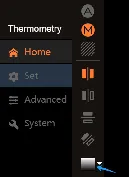
How to configure the commonly used Iron in Color Palettes for ATR31/ATR61 ?
After logging into the device’s web interface by entering the default IP address (192.168.1.123) in a web browser, navigate to the left-hand toolbar on the screen. Look for the Color Palettes settings, and select “Iron”.